Know what a job is worth — before you start

Calculate hours and materials, set your margin, and convert your calculation into a quote with one click. No guessing, no unprofitable jobs.

  • Live purchase prices via 2BA integration
  • Margin monitoring: green, amber, or red per line item
  • From calculation to quote to work order in one click
  • Templates for recurring job types
5_stars    Over 20,000 daily users
_BEN1148 transparant
Free download

Free Cost Calculator in Excel

Want to try this yourself in Excel first? The same calculation logic as above, now as a free downloadable template — with example calculations for HVAC, construction and security.

OutSmart Calculation is pricing and margin software for field service companies that lets technicians and office staff calculate job costs, labour hours, and material prices directly from a work order or quote. Price lists, labour rates, and margin targets are centrally managed — so every quote uses the right figures, every time.

Manual calculation vs. OutSmart Calculation

Step Without OutSmart With OutSmart
Labour costs Manually multiplied from hourly rate and estimated time Automatically calculated from rate card and registered hours
Material prices Looked up per item in a spreadsheet or catalogue Linked directly to the product database with live prices
Margin control Calculated after the fact — often too late Real-time margin visibility per job and per quote line
Rate management Rates stored in different spreadsheets per person Central rate card — one update applies to all quotes immediately
Quote accuracy Errors common due to manual entry and stale data Consistent, correct figures pulled automatically from master data
Approval workflow Email back-and-forth or verbal confirmation Digital approval with audit trail — who approved what and when

Know your margin before you commit

BenefitWhat it means in practice
Margin visible before the quote goes outEnter hours and materials and see immediately whether the job is profitable — no surprises after the fact
No manual calculationThe system calculates cost price, markup, and selling price automatically based on your settings
Always up-to-date purchase pricesLink your 2BA supplier catalogue and prices update automatically
From calculation to quote in one clickNo copying, no re-entering — your calculation becomes your quote directly
Reusable templatesSave standard job types as templates and reuse them for similar work orders
Post-calculationCompare actual hours and materials with your estimate and sharpen future quotes

From cost price to sent quote in three steps

Step 1

Enter hours and materials

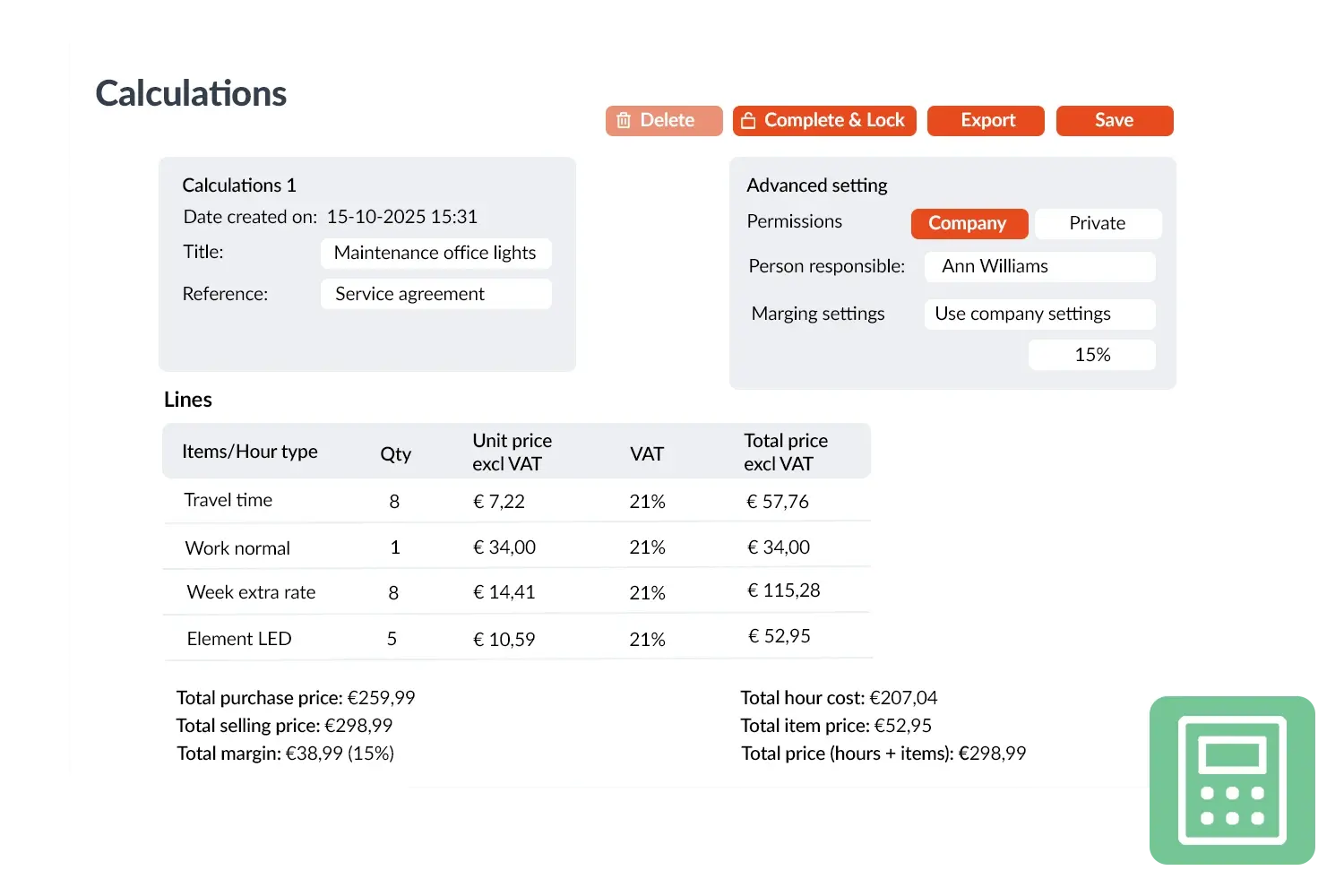
Pick from your price book or add new items. OutSmart retrieves purchase prices automatically — via your 2BA integration or your own price list.

Step 2

Set your margins

Specify the markup you want per line or per category. The system immediately shows the selling price and your margin in euros and as a percentage.

Step 3

Convert to quote

Happy with the result? One click produces a ready-to-send quote with the correct amounts and a digital signature link for your client.

Calculation in OutSmart — cost price and margin at a glance

Margin monitoring

Always in control of your profitability

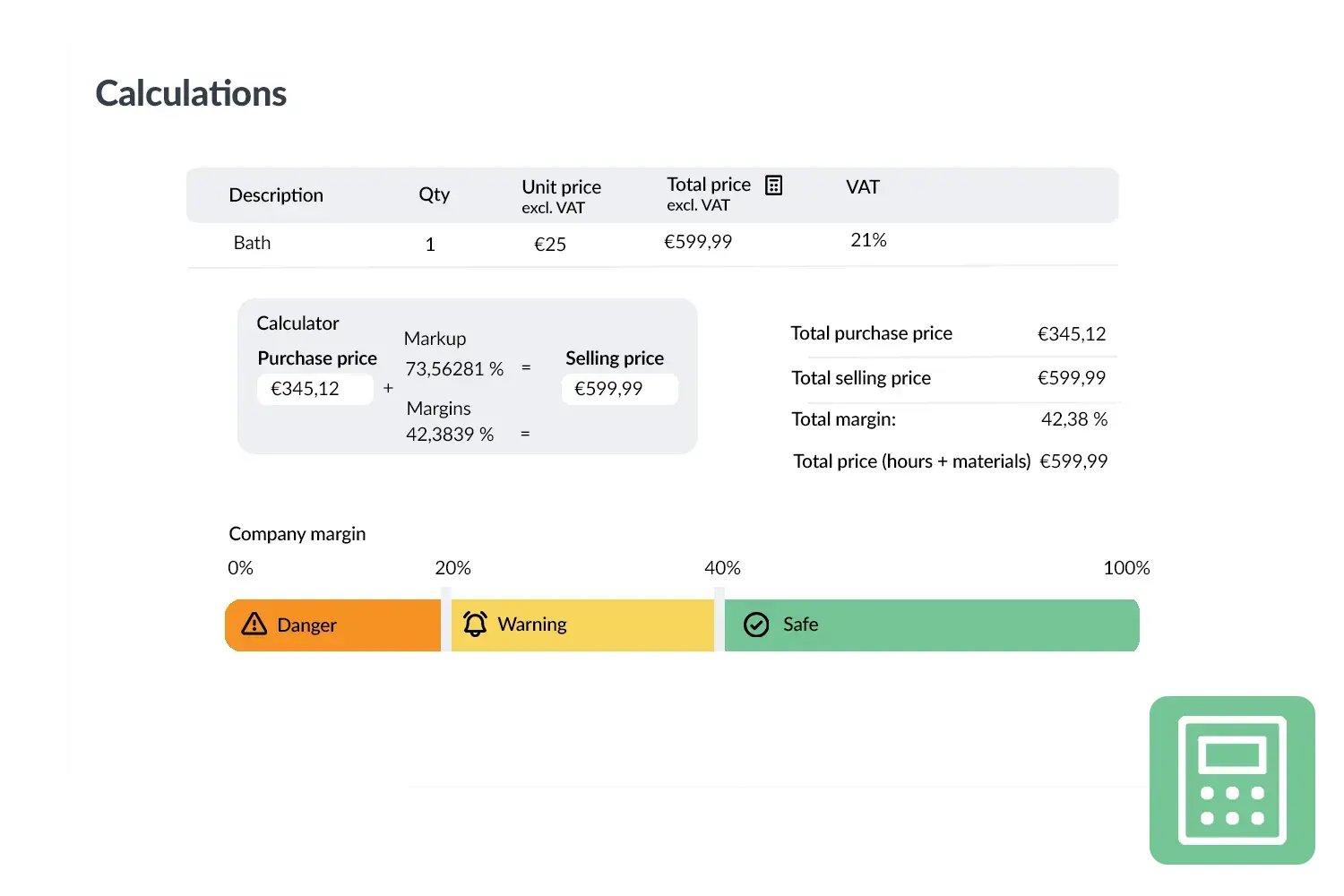
No more guesswork. OutSmart shows per line and per calculation whether your margin is safe, borderline, or unacceptable — with a colour coding you configure to match your own profit targets.

Green — safe

Your calculation is well above the set company margin. You can send the quote with confidence.

Amber — caution zone

Your margin is approaching the threshold. Review the line items or adjust the selling price before sending.

Red — not profitable

This calculation will result in a loss. OutSmart warns you before the quote leaves your desk.

Thresholds are set by you in Calculation settings — so the monitoring matches your margin targets, not a generic default.

Quote sections in OutSmart — subtotals per room or phase

Quote sections

Your client chooses what they want — you stay in control

Working on a project with multiple rooms, phases, or decision points? Split your calculation into sections — each with its own price and margin. The client sees the subtotals and can accept or decline each section online.

  • Subtotal per section — client sees exactly what each part costs
  • Online acceptance per section — client accepts bedroom, declines living room
  • Duplicate sections — build one section and copy it as a starting point for the next
  • Individual margin per section — higher margin on labour, lower on materials

Example: an A/C installation split into bedroom and living room sections. The client accepts the bedroom immediately and asks for time to consider the living room — you know exactly what's going ahead.

End-to-end workflow

Never enter the same data twice

OutSmart is one connected chain. Your calculation becomes your quote. Your quote becomes your work order. No copying, no retyping, no handover errors.

Step 1
Calculation

Hours, materials, margins, and templates. You lock in the cost price including your target profit margin.

Step 2
Quote

One click converts your calculation into a professional quote. The client signs it digitally.

Step 3
Work order

After acceptance the work order is created — with all materials and hours already filled in. Your technician just executes.

Which field service companies use OutSmart Calculation?

Installation and HVAC

Dozens of quotes a month for installations, maintenance, and call-outs. Save standard job types as templates — a quote for a boiler replacement is ready in two minutes, with the right material costs and margin.

Construction and renovation

Projects with multiple phases, subcontractors, and changing material prices. OutSmart keeps your pre-calculation and compares it with actuals after completion. You know per project where the margin went.

Service and maintenance

Repeat clients, recurring jobs. Build a calculation template once per maintenance package and reuse it — consistently priced, always profitable.

A real example

An electrical installation company

Previously they quoted in a shared spreadsheet. When material costs rose, the update was sometimes missed. Under time pressure, quotes went out quickly — but not always at the right margin.

Since OutSmart: purchase prices come in automatically via 2BA. Standard job types are saved as templates. A technician can start a calculation themselves; the planner approves and sends the quote. Turnaround time from calculation to sent quote: from 45 minutes to 8 minutes.

What customers say

Field service companies on their experience with OutSmart.

Niels Luijten - Dyzle

"The switch to digital work orders went smoothly. We now work with much more overview, speed, and certainty."

Niels Luijten
Dyzle

Kimberley - Oostendorp Nederland

"OutSmart gives us one clear system for projects, service, and maintenance. Planning has become much simpler."

Kimberley
Oostendorp Nederland
Tom Groot - VKS Schiedam

"OutSmart has significantly improved our workflows. Thanks to the AFAS integration, post-calculation and invoicing are perfectly connected."

Tom Groot
VKS Schiedam
Martijn Kooijman - AaproTec

"With OutSmart we work fully digitally: technicians see their assignments directly and we respond faster to urgent callouts."

Martijn Kooijman
AaproTec
20,000+daily users
5,172customers
3.2Mwork orders per year
14+years experience
3232784

Work orders per year

5172

Customers trust OutSmart

14
+

Years of experience

We constantly had to create work orders manually with pen and paper. By providing a clear digital system with many options, along with an excellent helpdesk that assists with everything, even the smallest questions, Outsmart has helped us.

Thomas Loos, Display4all

We used to lose work orders now and then, which made tracking time a challenge. With the easy digital entry of work orders, it's much simpler for the technician to manage the administration. Having 100% accurate work orders has definitely cut our administrative time in half.

Pascal Hanenbergh, Hanenberg Techniek


Frequently asked questions about OutSmart Calculation

Field service calculation software helps companies calculate accurate job prices from labour rates, material costs, and overheads — directly from a work order or quote. OutSmart Calculation centralises your rate cards so every technician and office user works from the same figures, eliminating manual errors and margin leakage.

Yes. OutSmart supports multiple rate cards — standard rates, overtime, weekend tariffs, specialist surcharges, and customer-specific pricing. Rates apply automatically based on technician role, job type, and time of day — no manual calculation needed.

Real-time margin visibility is shown at the quote and line-item level before you send anything to a client. You can set minimum margin thresholds that flag or block quotes that fall below target, so nothing goes out at a loss without a deliberate approval.

Yes. Technicians can register materials, hours, and travel costs in the OutSmart mobile app while on-site. These figures feed directly into the calculation module, so office staff have accurate data for follow-up invoices or quotes without waiting for paper forms.

Yes. OutSmart integrates with Exact Online, AFAS, SnelStart, and Moneybird. Calculated costs, prices, and invoice data sync automatically to your accounting package — no CSV files, no manual reconciliation.

Yes. Fixed-price services, maintenance packages, and recurring call-out fees can be saved as standard price templates. Applying them to a new quote or work order takes one click — no rebuilding from scratch each time.

Yes. OutSmart supports multiple VAT rates and currency configurations, which is useful for companies serving both domestic and international clients or operating across multiple countries.

Yes. Open your calculation, adjust the line items, then choose export and select an existing quote in draft status. OutSmart pulls through all updated lines - no need to rebuild the quote from scratch.

Individual lines cannot be duplicated, but calculation sections and quote sections can. Build one section and duplicate it as a starting point for the next - useful when most of the content is the same.

Yes. Build a complete quote once and duplicate it as a starting point for the next job. All lines, files, and layout carry over. The calculation module is ideal for recurring job types, but quote duplication works just as well.

No. A standard user licence is all you need. The calculation module is available from the Maximize package; the quote module is included in Accelerate (and as a Power-up in Boost). See our pricing page for details.

Try OutSmart completely free for 14 days!