



Landscaping and Green Maintenance Companies

Efficient Planning and Execution of Green Projects

Landscaping and green maintenance companies deal with a diverse mix of tasks every day, from regular garden maintenance to new installations and large-scale landscaping projects. With OutSmart, you can easily schedule teams and equipment, and instantly see who is working where. Any changes in the planning are automatically shared via the app, ensuring everyone always has the latest information and miscommunication is avoided.

5_stars    Over 20.000 happy daily users
Male hero
Quick overview
 
Scheduling board, work orders and contract management in one system — no more WhatsApp groups for daily planning
 
Staff register time, photos and signatures on site via the app — instantly visible at the office
 
Maintenance contracts automatically scheduled — never miss a recurring service visit or leave it unbilled
 
Customer portal gives clients direct access to schedules, work orders and invoices — without your back office having to call them
 
The result: more billable hours, less admin, and customers who are always kept in the loop

What customers say

Landscaping companies about OutSmart

“I’ve been using OutSmart for ten years with great satisfaction. What I was looking for was an app that’s easy to use, reliable, and backed by a transparent company.”

— Bart Bremer, Owner, BS Tuinen

“We’re growing at around 15% per year. Normally you’d need to scale your team too. But with this software we handle that growth with the same people.”

— Frank Meijsen, Strategic Advisor, DeMo Service & Industrial Doors

“Five years ago we were still dependent on paper files. Since switching to OutSmart, that’s history. Everything runs faster, error-free and fully digital.”

— Kimberley, Administration, Oostendorp Nederland

Does this sound familiar?

The challenges of a modern landscaping business

From small garden jobs to large green projects — your staff work outside while admin piles up indoors.

Peak season chaos

Spring demand surges, winter slows. Scheduling teams across shifting projects takes hours of calls and WhatsApp messages — mistakes are inevitable.

Hours tracked via WhatsApp messages

Staff send hours over WhatsApp. You chase the messages, piece together the total and create an invoice manually. Missed hours are lost revenue — and you find out too late.

Materials not tracked

Plants, soil, fertiliser, tools — you have no idea what was used on which project. Procurement goes wrong and margins become invisible.

Recurring contracts forgotten

Subscription-based garden maintenance is valuable — but only if every visit actually happens. Tracking periodic jobs manually in Excel is error-prone and time-consuming.

Customers calling for updates

"When is your team coming?" — your back office answers that question ten times a day. Customers have no visibility into scheduling, progress or invoices.

Fixed price or hourly — you don’t know where you stand

On fixed-price projects you only find out halfway through whether it still makes sense. On hourly work, hours disappear because they were never logged. Both cost you margin without you noticing.

Comparison

OutSmart vs. alternatives for landscaping companies

No HVAC overhead. No enterprise pricing. Built for businesses like yours.

FeatureOutSmartSpecialist garden softwareExcel + WhatsApp
Built specifically for field service (not HVAC)✓ Fully⚠ Limited
Digital work orders with photos & signatures✓ Standard⚠ Partial✗ Not possible
Time tracking per plot/location✓ Automatic
Customer portal included✓ Standard⚠ At extra cost
Auto work orders for maintenance contracts✓ Fully automatic⚠ Partial✗ Manual tracking
Integration with Exact, QuickBooks, accounting✓ Direct⚠ Limited✗ Manual re-entry
SMB pricing (no enterprise fees)✗ Enterprise pricing
Direct invoicing from work order✓ No re-entry⚠ Partial✗ Hours later
“I want my people to know where they’re going and for me to see what’s been done — without phone calls.”
— Owner, landscaping company, 12 employees
Planning & Deployment

Always know who is working where

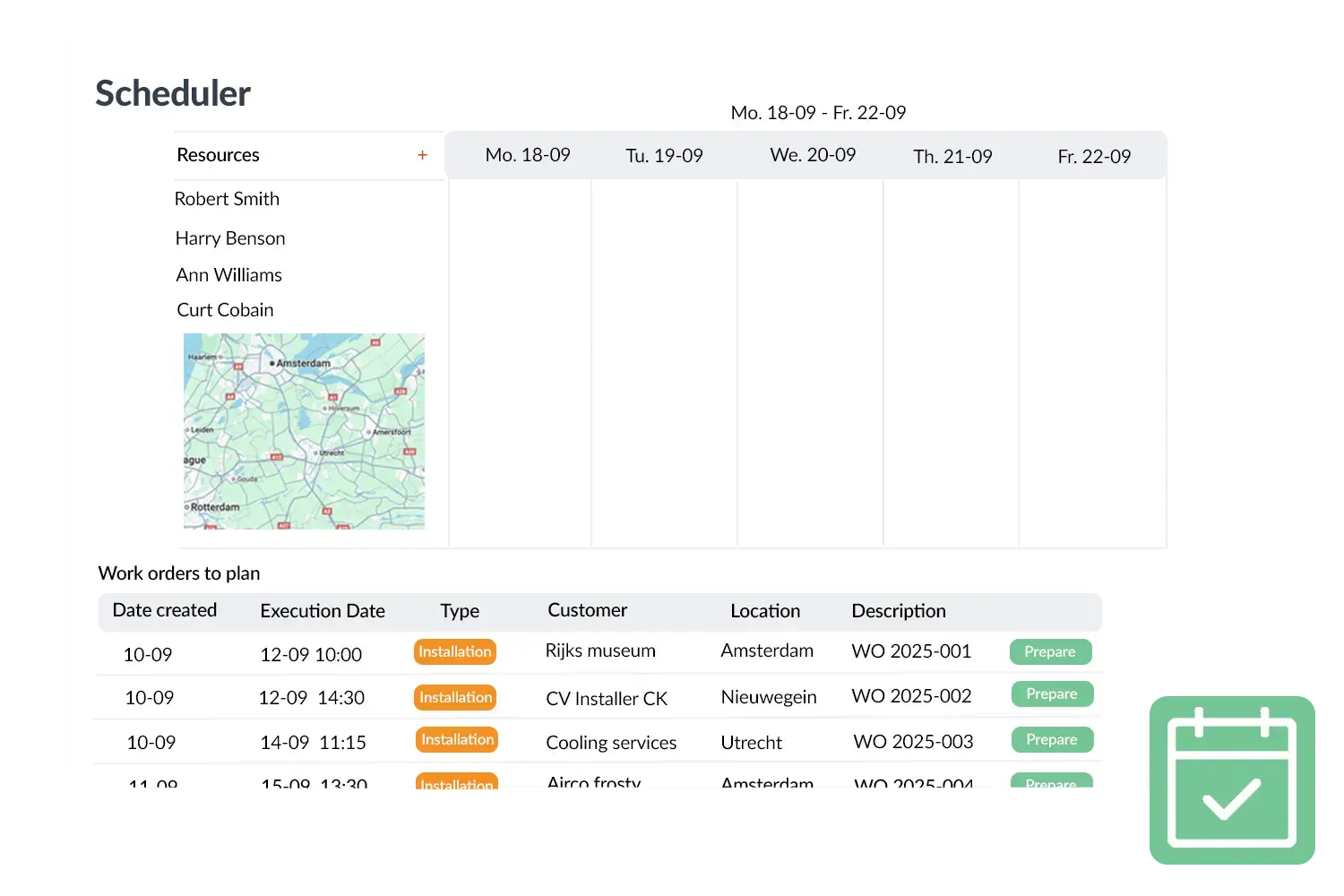
With OutSmart’s digital scheduling board you assign staff, vehicles and equipment to every project — from new planting to recurring maintenance. For landscapers with fixed routes per neighbourhood, OutSmart ensures a logical sequence. Changes are instantly visible in your team’s app.

  • Drag-and-drop — scheduling staff takes seconds
  • Real-time updates — a change at the office is immediately visible to the team member
  • Multiple crews — overview across all your teams at once
  • Equipment & vehicles — schedule and track machinery too
  • Route optimisation — staff follow the most efficient route through fixed maintenance areas
  • Ad-hoc jobs — urgent job comes in? Scheduled within a minute
OutSmart digital scheduling board for landscaping companies
Contracts & Materials

Never miss a maintenance visit again

Subscription-based garden maintenance is highly profitable — but only if every visit is carried out and invoiced. With OutSmart you set up maintenance contracts once and work orders are created automatically.

  • Automatic work orders — weekly, fortnightly or monthly maintenance is scheduled without any manual input
  • Contract management — all agreements per customer in one overview
  • Inventory management — what materials do you have in stock and where?
  • Material tracking — log use of plants, soil and supplies per project
  • Object management — manage gardens, locations and installations per customer
OutSmart contract management and inventory for landscapers
OutSmart photo documentation per location for landscapers
Work Orders & Documentation

Proof the work was done — no disputes afterwards

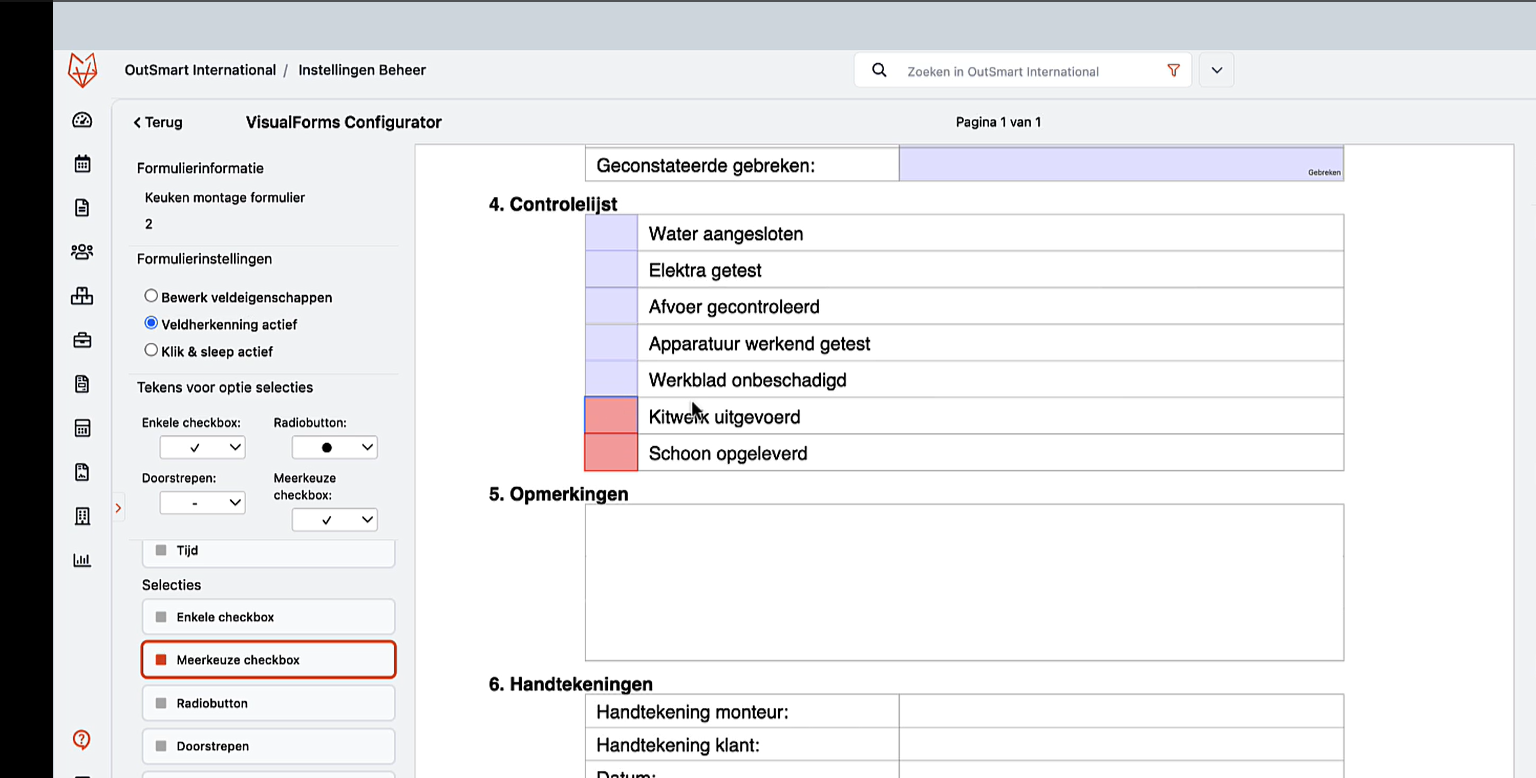
Councils, housing associations or private clients — everyone wants to know exactly what was done. With OutSmart your team member takes photos during the job. These are automatically linked to the work order and the object.

  • Before/after photos — team member photographs the plot on arrival and departure
  • Per location/object — photos linked to specific garden area or address
  • Digital customer signature — on-site, on screen
  • Automatically filed — find anything by customer, date or location
  • Shareable via customer portal — client sees exactly what was done
Time Registration

Finally know exactly how long each location takes

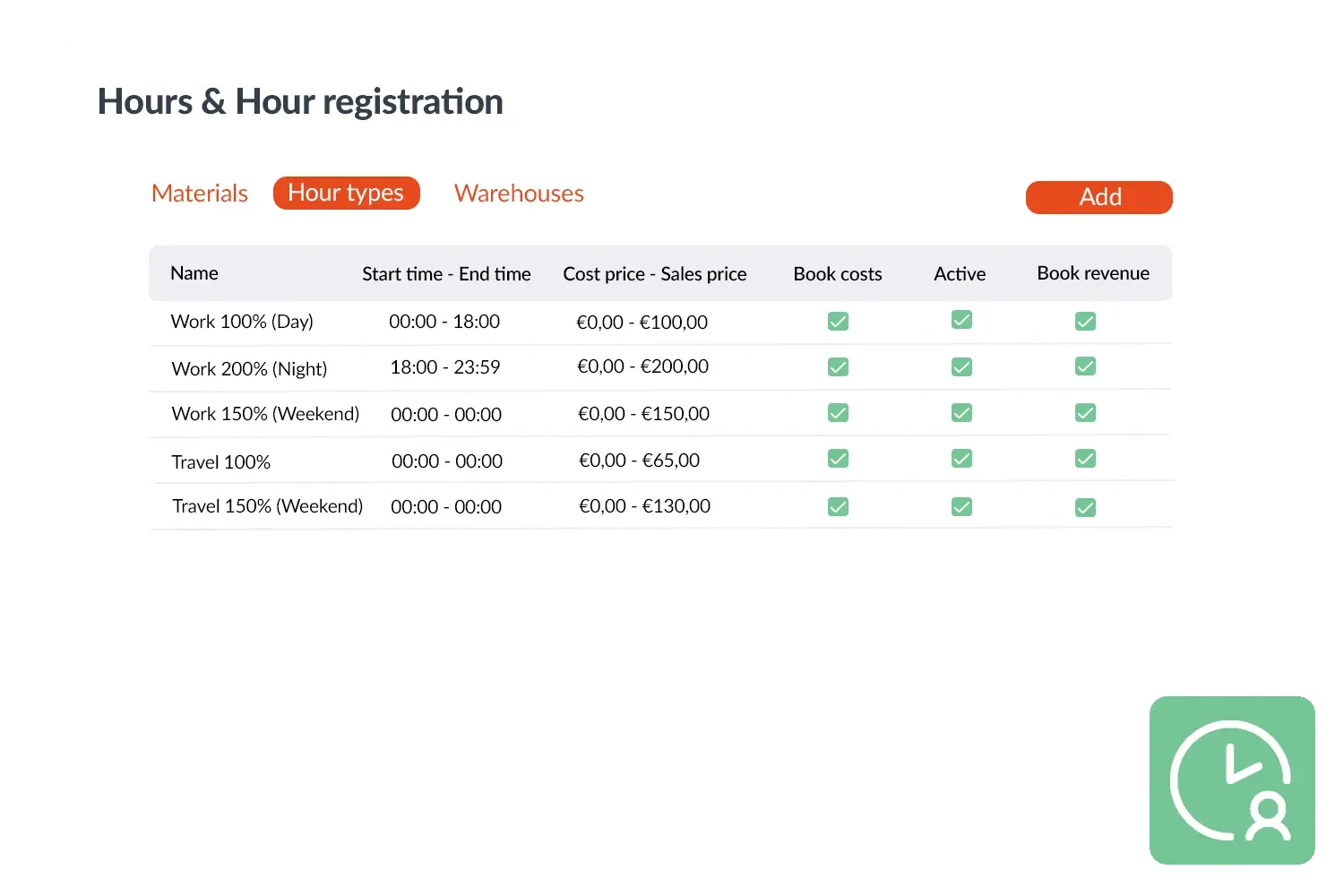
Do you know precisely whether that garden is still profitable? With OutSmart every team member registers their time per object — automatically, by checking in on location.

  • Check in on location — team member starts the clock on arrival, stops on departure
  • Per plot/object — see exactly how many hours per address per season
  • Compare to quote — is what you invoice also what it costs?
  • Post-calculation per contract — back your rates when renewing
  • Fixed price vs. hourly — on fixed-price work you see immediately if you’re over budget; on hourly work all hours flow automatically to the invoice
  • No manual entry — GPS check-in, no paper
OutSmart time registration per location for landscapers
OutSmart customer portal for landscaping companies
Customer Portal

Stop answering calls about “when are you coming?”

Councils, property managers and private clients just want to know what’s happening and when. With the OutSmart customer portal they answer that question themselves — without calling your back office.

  • Schedule visible to the client — when is the team coming, which plot
  • Photos of completed work — proof of execution instantly available
  • View & download invoices — fewer admin queries
  • Per object or location — council or housing association only sees their own plots
  • You control access — client gets a login, you decide what’s visible
3232784

Work orders per year

5172

Customers trust OutSmart

14
+

Years of experience

We constantly had to create work orders manually with pen and paper. By providing a clear digital system with many options, along with an excellent helpdesk that assists with everything, even the smallest questions, Outsmart has helped us.

Thomas Loos, Display4all

We used to lose work orders now and then, which made tracking time a challenge. With the easy digital entry of work orders, it's much simpler for the technician to manage the administration. Having 100% accurate work orders has definitely cut our administrative time in half.

Pascal Hanenbergh, Hanenberg Techniek


What customers say

Field service companies share their experience with OutSmart.

Dyzle

"The switch to digital work orders was smooth. We now work with far more clarity, speed and confidence."

Niels Luijten
Dyzle
Oostendorp

"OutSmart gives us a clear system for projects, service and maintenance. Scheduling has become much simpler."

Kimberley
Oostendorp Nederland
VKS Schiedam

"OutSmart has significantly improved our workflows. The AFAS integration makes post-calculation and invoicing seamless."

Tom Groot
VKS Schiedam
AaproTect

"With OutSmart we work fully digital — team members see their jobs instantly and we respond faster to urgent calls."

Martijn Kooijman
AaproTect
Frequently asked questions

Everything about OutSmart for landscaping companies

What is the best software for landscaping companies?

The best software for landscaping companies combines scheduling, work orders, time tracking, inventory management and contract management in one system. OutSmart is built specifically for companies with field-based staff. You schedule crews via a digital planning board, staff work via an app on their phones, and administration is handled automatically.

How do I digitalise work orders as a landscaper?

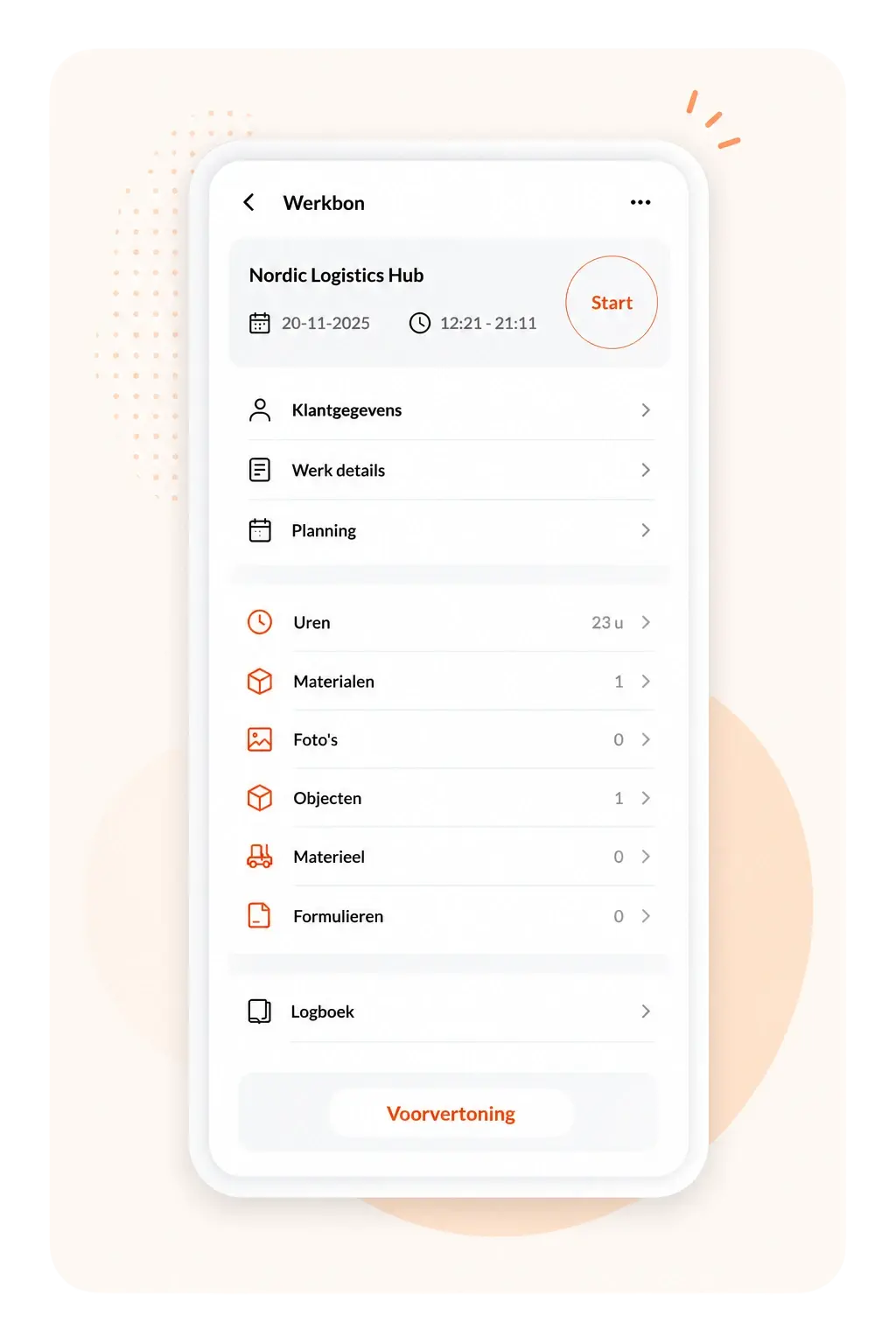
With OutSmart you replace the paper work order with a digital version in the app. Your team member automatically receives the job, logs start and end time, adds materials used, takes photos and gets the customer to sign digitally. The work order is immediately visible at the office and ready for invoicing.

Can OutSmart automatically handle maintenance contracts?

Yes. With contract management you set up which customer receives which maintenance and how often. OutSmart automatically creates work orders on the scheduled date. You’ll never miss a maintenance visit again and you always invoice completely.

How do I track material usage per project?

In OutSmart you link materials directly to the work order. The team member selects from the app which materials were used — plants, soil, fertiliser, tools. This is automatically processed into stock records and the invoice.

Does OutSmart work for companies with multiple crews?

Yes, OutSmart excels at multi-crew planning. Via the digital scheduling board you see in one overview which crews are working where and which vehicles and equipment are deployed. Changes are instantly visible in every team member’s app.

Can I send invoices directly from OutSmart?

Yes. After the work order is completed, hours and materials are automatically compiled for invoicing. You can send invoices directly from OutSmart or export to Exact, QuickBooks, accounting software and more.

Isn’t OutSmart too expensive for a landscaping business with tight margins?

Fair question — but flip it around: what is it costing you now? One forgotten maintenance invoice per month, hours that go unbilled because the work order got lost — that adds up fast. The trial is free, no commitment required.

How long does it take to set OutSmart up?

Most landscaping businesses are operational within one working day. You import your client list, create your first work order template and schedule your first crew. We help with onboarding — including a setup call and help configuring your maintenance contracts.

My staff don’t want to use an app — how do I handle that?

Experience shows that staff adapt quickly when the app is genuinely easier than the alternative. OutSmart has one screen: here’s your job, tap when you’re done. Most landscaping teams are self-sufficient within ten minutes.

What does software for landscaping companies cost?

OutSmart is billed as a monthly subscription per user. You always start with a free 14-day trial — no credit card required. See current pricing on the pricing page.

Does OutSmart support both fixed-price and hourly work?

Yes, both models are supported. On fixed-price jobs you see via time tracking how many hours have been spent versus the quote — so you can act before a job goes loss-making. On hourly work all registered hours are automatically passed to the invoice, with no manual re-entry.

My staff send hours via WhatsApp — how does the switch to the app work?

The app works just like WhatsApp, but structured: team member opens the work order, enters start and end time, adds materials. That’s it. Most landscaping businesses make the switch in one afternoon — not because they have to, but because it’s easier for the team too.

Try OutSmart completely free for 14 days!