Work order and project software for construction & maintenance companies

Digital work orders, planning, projects and invoicing in one system — used daily by 5,000+ field service companies.

Record work orders digitally, log hours automatically and manage projects in one system. No paperwork, no double entry — just fast, error-free jobs that stay on schedule from planning to invoice.

5_stars    Over 20,000 happy daily users
Maintenance
Quick overview
 
OutSmart replaces paper work orders with a digital system that links quotes, work orders, planning and invoicing, without double entry
 
Field technicians log hours, materials and change orders on the job site via the app, even offline
 
The back office gets real-time insight into progress, budget and outstanding invoices, without chasing updates
 
A direct integration with Exact, AFAS or SnelStart eliminates manual re-entry into accounting
 
The result: faster invoicing, fewer errors and full control over your projects, trusted by 5,000+ construction and maintenance companies

More than 5,000 companies deliver great service with OutSmart

Hubo logo grijs Logo klant Anouar zwart Democo logo zwart Ological logo zwart All-in Bedrijfsdeuren & Docking zwart Bang & Olufsen Jordens logo zwart Hygienic care logo zwart Cloudius logo zwart Oostendorp logo zwart Logo klant zwart Demo bedrijfsdeuren Logo klant zwart MV deurenservice Klant logo GSH
5,000+
Companies
work with OutSmart every day
20,000+
Field Technicians
use the OutSmart app
50+
Integrations
with accounting and ERP systems
Sound familiar?

The daily challenges of a construction & maintenance company

From small maintenance jobs to large construction projects, companies in the field run into the same bottlenecks every day.

Where is the latest work order for this project? Paper work orders get lost on the job site or arrive too late at the back office. Invoices get delayed by weeks. How do I keep track of multiple projects at the same time? Multiple jobs running in parallel, rotating crews and urgent callouts. Without one central system, you quickly lose the overview. clock-countdown-light-1 Do the hours we quoted match what we actually worked? Hour overruns only surface too late. By the time you course-correct, the margin has already evaporated.
How do I quickly produce a quote that's actually accurate? Quotes in Excel or Word take too long and lead to errors in the field. Converting a quote to a work order doesn't happen automatically. Who is available for which job tomorrow? Planning via chat groups or a whiteboard causes miscommunication. Updates reach the crew too late — or not at all. Why does it take so long before I can send an invoice? Hours worked, materials used and change orders are collected manually. That takes days and leads to missed line items.
5,000+
Companies
work with OutSmart every day
20,000+
Field Technicians
use the OutSmart app
50+
Integrations
with accounting and ERP systems
"
We have been using OutSmart for over 3 years. Two technicians on the road every day — it works perfectly, never any issues and the support is excellent.
Ralph Creusen ALCO Roofing
"
We used to deal with paper chaos and risks around our analogue planning board. OutSmart helped us through the digitalisation of work orders and scheduling. Everything became much more transparent.
Ivo Signorini Jordens Kunststoffen B.V.
"
Great support and easy to implement in your business. You come across as far more professional to clients — with a polished layout that's fully tailored to your company.
Dirk Schinkel Schinkel Tiling
 
Digital Work Orders

Never lose a work order on the job site again

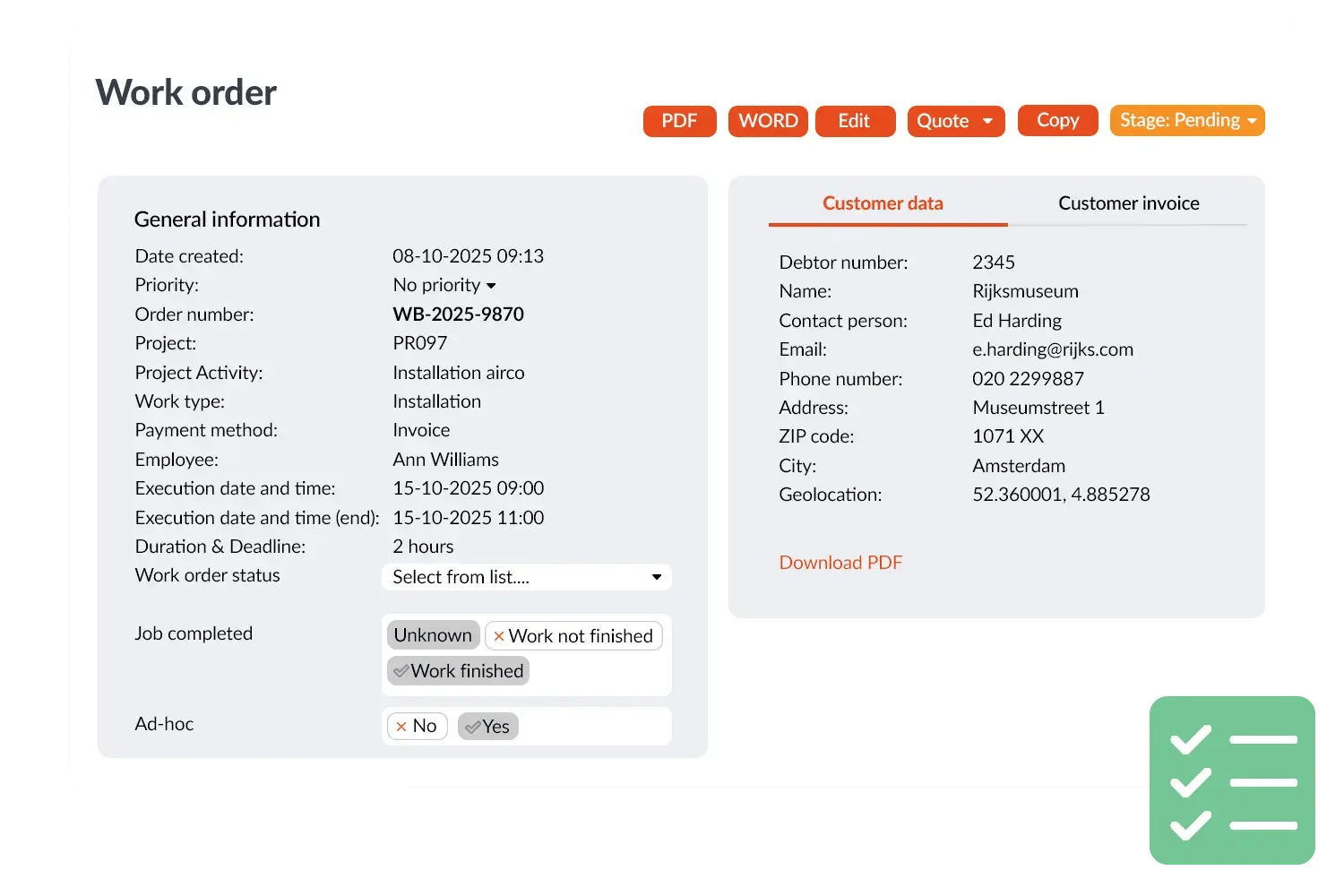
Create work orders from the office or directly from a signed quote. Your field engineer has everything on their phone: drawings, job description, client details and previous visit history. The client signs digitally for approval, no paper needed.

 
One-click creation from a quote — no double entry
 
Job photos added directly to the work order
 
Digital client signature on completion
 
Works offline on poor connectivity at the job site
More about digital work orders →
Handy for keeping photos on file — you can clearly see what was done at the client's site last time. Great sync between devices too.
Bianca · De Openhaarden- & Plavuizenspecialist
Werkbon visual 2-1
 
Project Management

Large projects under control, from kick-off to handover

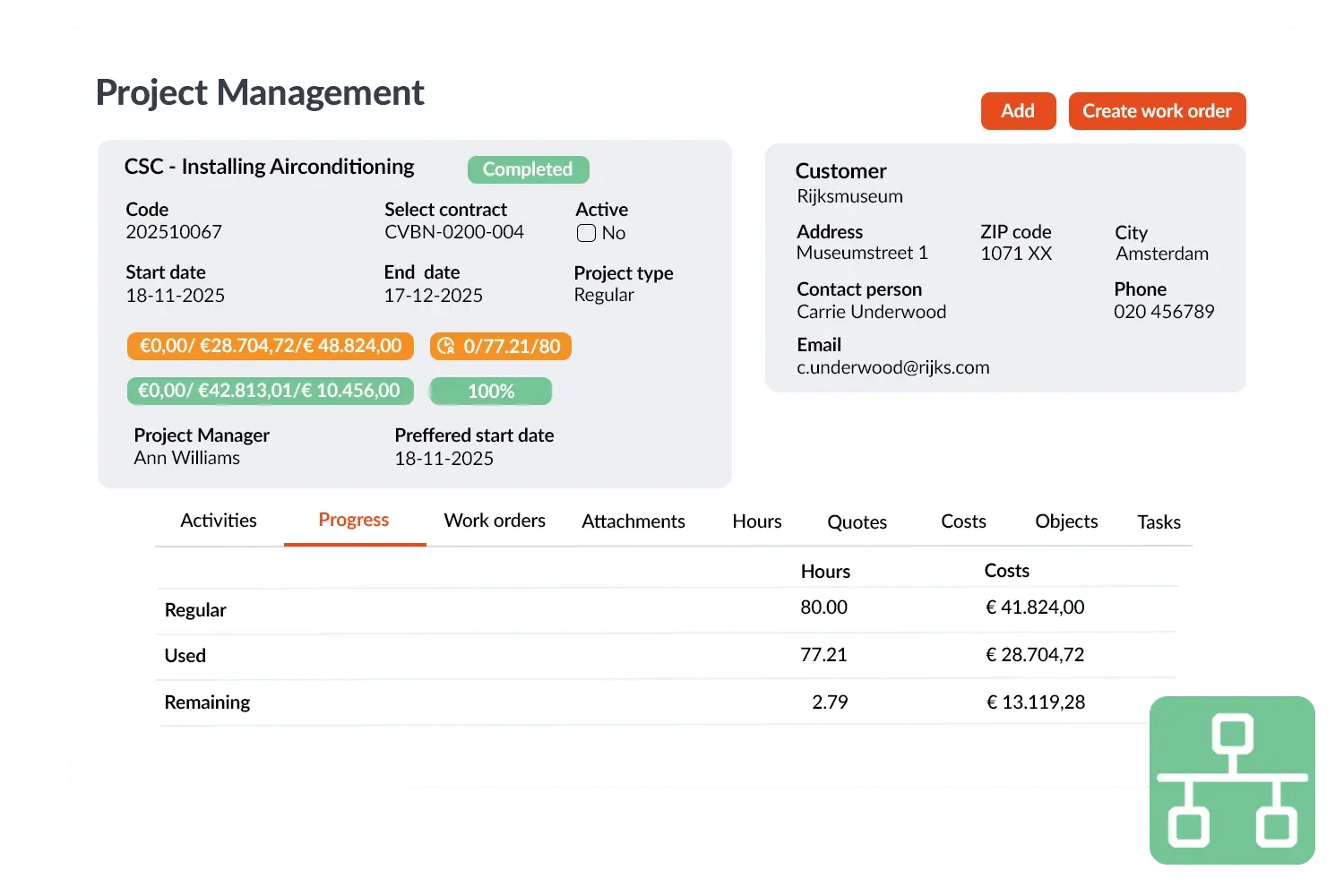
Multiple engineers, multiple days, multiple sites. In OutSmart you track what was completed per phase, how many hours were logged and whether the budget is still on track. You can adjust from the office or on the go.

 
Budget vs. actual hours visible in real time
 
Multiple project phases each with their own work orders
 
Log and invoice change orders directly on the running project
 
Documents, drawings and photos bundled per project
More about project management →
"We can now work in a much more focused and compact way, without all those separate steps from before. That frees up time for other things."
Rudmer de Vries · Owner, Drowa & Infilldrain
Projectbeheer visual 2
 
Planning & Schedule Board

The right person in the right place at the right time

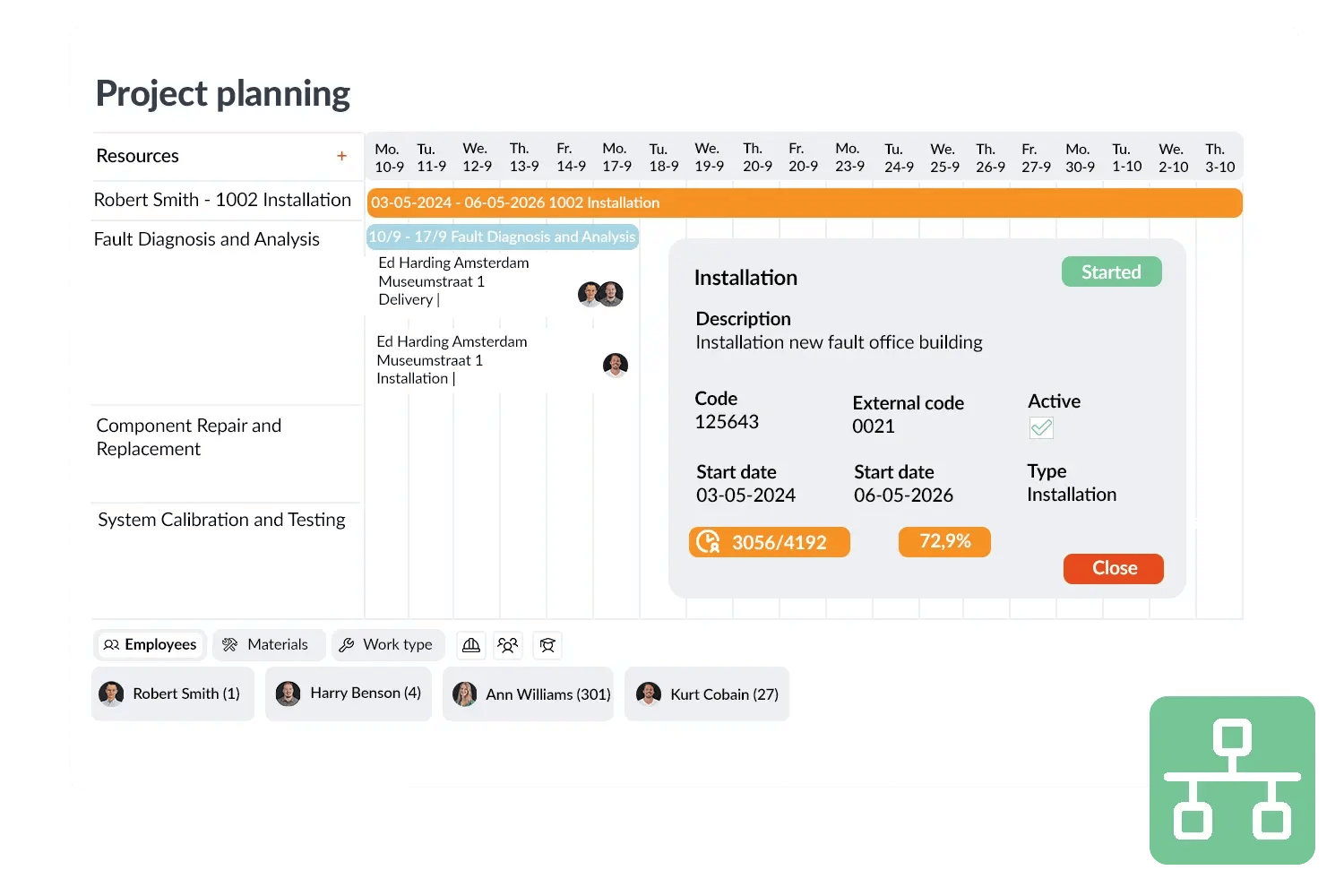
Drag jobs to the right engineer on the digital schedule board. When you update the plan, your crew sees it instantly on their phone — no calls needed. Urgent callouts are handled in seconds.

 
Drag-and-drop schedule board for the entire crew
 
Push urgent callouts directly to the right engineer
 
Day, week and month view all in one screen
 
PlanSmart: smart route optimisation per day
More about the schedule board →
"When an urgent callout comes in, we create a digital work order. It goes straight to the engineer automatically. You can react incredibly fast without any physical contact."
Martijn Kooijman · Owner, AAprotec
Projectplanning visual 2
 
Quotes & Estimating

Better quotes, better job prep, better margin

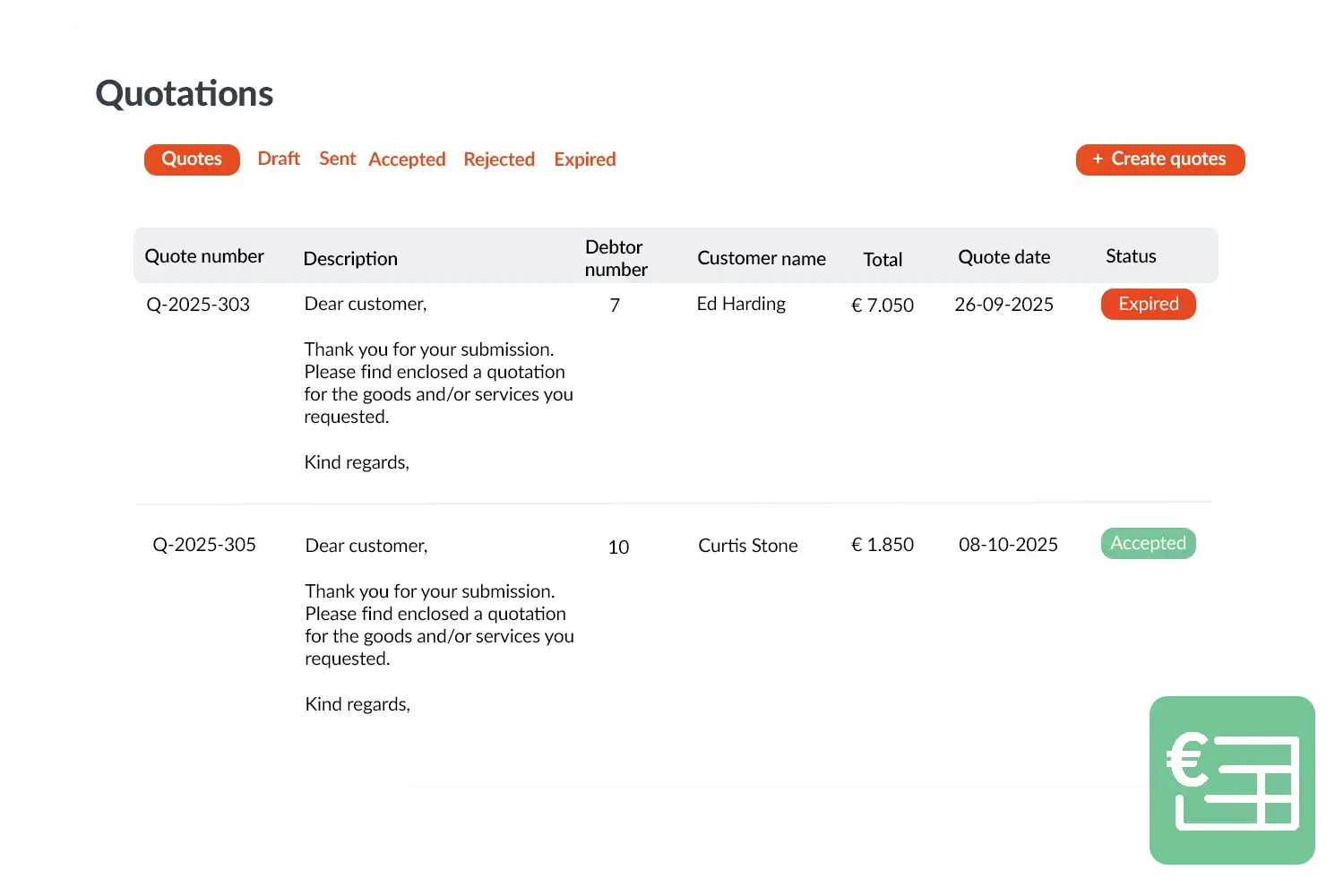
Build a quote including materials list, hours and margins. Once approved, convert it directly into a project work order — no re-typing. Post-calculation is compared to the quote in real time.

 
Quotes with hours and materials calculation in minutes
 
One-click conversion: quote → work order → invoice
 
Add change orders directly to the running quote
 
Integrations with Exact, AFAS, SnelStart and more
More about quotes →
"With OutSmart you get better quotes, better job preparation and better planning. Everything from the same system."
Frank Meijsen · Strategic Advisor, DeMo Service- en Bedrijfsdeuren
Offerte visual 2
 
Contracts & Maintenance Planning

Recurring maintenance automatically scheduled and invoiced

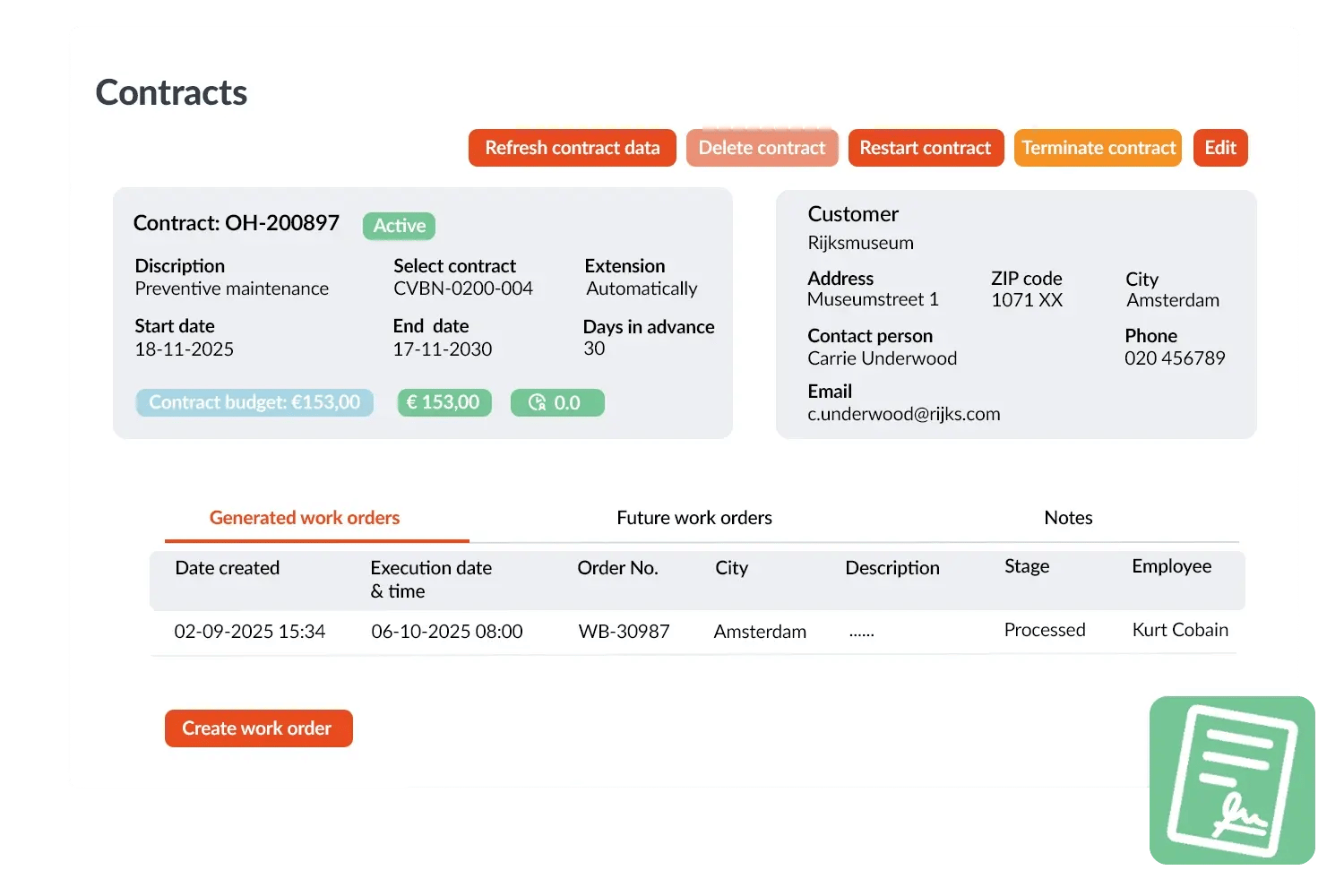
Manage maintenance contracts and SLAs in OutSmart. Periodic inspections and service rounds are automatically created as work orders and scheduled — without you having to think about it each time.

 
Automatically create work orders on the contract date
 
Expiry dates and contract values in one overview
 
Monitor SLAs: set response times per client
 
Automatic invoicing on a contract basis
More about contracts & SLAs →
"With OutSmart we have fully optimised our workflow. Now everything — from quote to invoice — flows seamlessly together."
Rudmer de Vries · Owner, Drowa & Infilldrain
Contracts visual 2

What customers say

Field service companies on their experience with OutSmart.

Niels Luijten
"The switch to digital work orders went smoothly. We now work with much more overview, speed and certainty."
Niels Luijten Dyzle
Kimberley
"OutSmart gives us a clear system for projects, service and maintenance. Scheduling has become much simpler."
Kimberley Oostendorp Nederland
Tom Groot
"OutSmart has significantly improved our work processes. The AFAS integration makes post-calculation and invoicing seamless."
Tom Groot VKS Schiedam
Martijn Kooijman
"With OutSmart we work fully digital: engineers see their jobs straight away and we respond faster to urgent callouts."
Martijn Kooijman AaproTect
Frequently asked questions

Everything about OutSmart for construction & maintenance

Common questions from construction and maintenance companies considering the switch to digital work orders and project software.

What is the best work order app for a construction company? +

OutSmart is a widely used work order app for construction companies, contractors and maintenance businesses. The app combines digital work orders, project planning, quotes and invoicing in one system. Field engineers work via the mobile app on phone or tablet, even offline on the job site. The back office gets real-time insight into progress, hours and material usage.

How do I digitise work orders in a construction company? +

Digital work orders completely replace paper forms. In OutSmart you create a work order from the office or from an approved quote. The field engineer receives it instantly on their phone, logs hours and materials on the job site and gets the client to sign digitally. The work order is immediately visible to the back office — no chasing or paper drop-off needed.

Can OutSmart also manage projects for larger construction jobs? +

Yes. OutSmart includes a full project management module that lets you handle change orders, multiple phases and multiple crews within one project. You compare estimated vs. actual hours, log change orders immediately and invoice per phase or at handover. Suitable for both small maintenance jobs and long-running new-build projects.

Does OutSmart work without an internet connection on the job site? +

Yes. The OutSmart app works offline. Field engineers can enter hours, materials and notes without an internet connection. As soon as connectivity is restored, the app automatically syncs with the system. This is essential for job sites in basements, tunnels or rural areas with poor signal.

Does OutSmart integrate with my accounting software? +

OutSmart integrates with more than 50 accounting systems, including Exact Online, AFAS, SnelStart, Moneybird and AccountView. Invoices and post-calculation lines flow automatically into your accounting package. This eliminates double entry and significantly speeds up the invoicing process.

How quickly can my construction company get started with OutSmart? +

Most construction companies are fully live within one to two weeks. OutSmart offers a free 14-day trial with no credit card required. After signing up you receive onboarding guidance and can create your first work order on the day of registration. For larger implementations, training and consultancy are available.

How much does work order software for a construction company cost? +

OutSmart charges a monthly subscription per user. You only pay for what you use — no hidden fees or long-term contracts. You can start with a free 14-day trial account. See current pricing on the pricing page or request a personal demo.

What is the difference between OutSmart and regular project software? +

Regular project software focuses on planning and reporting, but lacks the connection to the field. OutSmart links office and field in one system: from quote and planning at the front to work order, signature and invoice at the back. The engineer app, schedule board and back office are fully integrated — no more separate systems.

Ready to work smarter?

Try OutSmart free for 14 days. No credit card needed. Sign up in 5 minutes — and create your first work order before you even reach the job site.

More than 5,000 companies went before you · 3+ million work orders per year · Cancel anytime