Everything you need to know about digital contract management and SLA monitoring for field service companies.
What is contract management software for field service companies? +
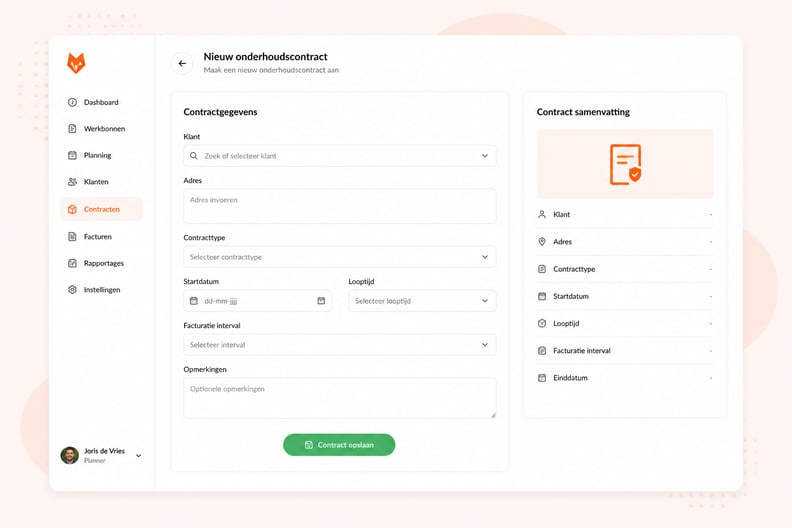
Contract management software for field service companies is a system that lets you manage all service contracts, SLA agreements and periodic maintenance schedules in one overview. In OutSmart you link each contract to a customer, set intervals and SLA terms, and the system automatically handles work orders, scheduling and invoicing.
How does OutSmart automatically create work orders for service contracts? +
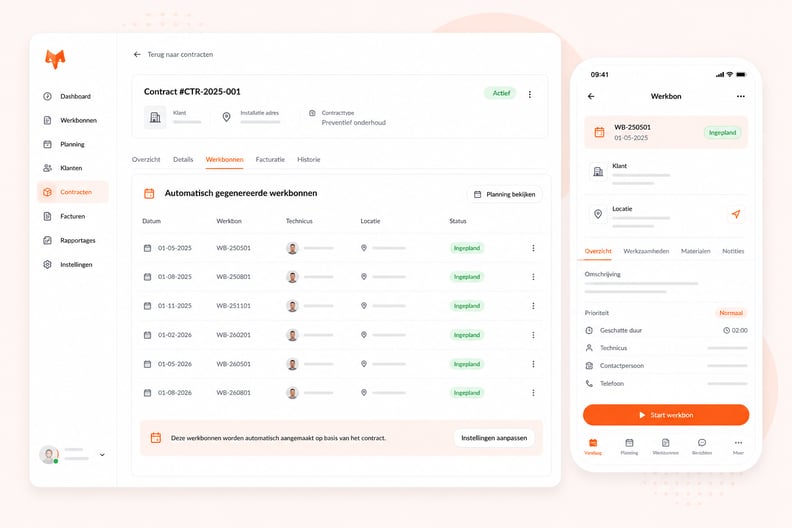
You record the contract once in OutSmart with the agreed interval (monthly, quarterly or annually) and the linked engineer. On the agreed date OutSmart automatically creates a work order and places it in the planning board. The engineer sees the job directly in their app — without you having to do anything.
How does OutSmart monitor my SLA agreements? +
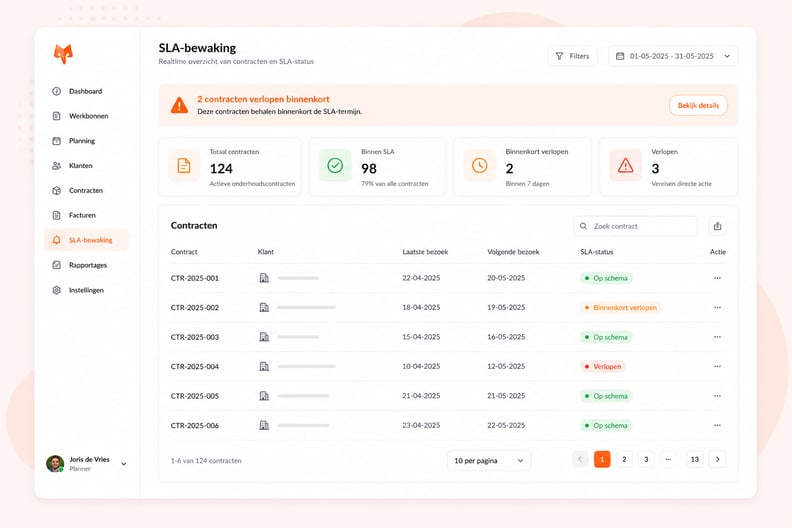
Per customer or contract type you set the maximum response time and resolution time. As soon as a breakdown report comes in, OutSmart starts the SLA timer. You see in the dashboard which tickets are at risk of missing the deadline. After resolution, the response and resolution time is recorded — verifiable proof in audits or disputes.
Can I automate periodic contract invoicing in OutSmart? +
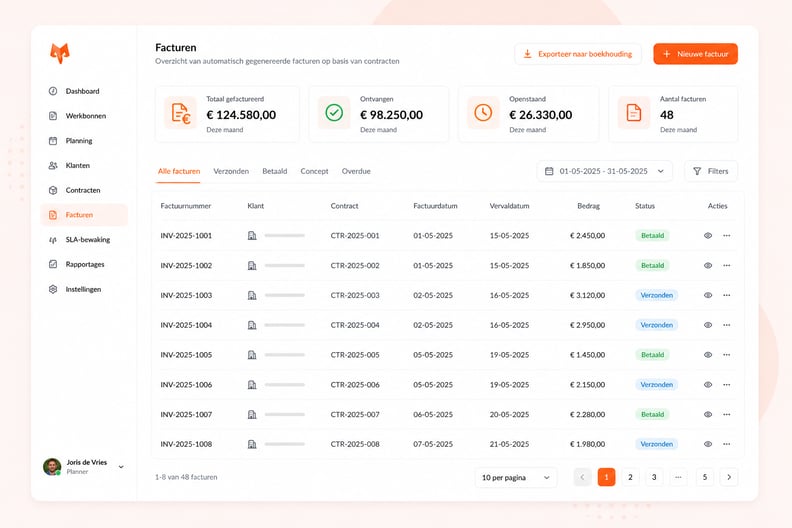
Partly. In OutSmart a contract automates the work, not the invoice: a preventive contract generates the work orders on its recurring schedule, and you create the invoice from each completed work order, with the hours and materials already copied over. The invoice period field on contract terms is not active yet, so OutSmart does not create recurring contract invoices on its own. A fixed contract fee, for example at the start of the contract period, is invoiced as a standalone invoice. Invoices then go to your accounting package through one of the integrations, such as Exact Online or SnelStart.
What is the difference between a service contract and an SLA in OutSmart? +
A service contract in OutSmart governs the periodic maintenance moments: when, who, how often and at what rate. An SLA (Service Level Agreement) is the associated agreement on response and resolution times for breakdowns. In OutSmart you manage both in one screen per customer.
Can I use OutSmart for multi-year service contracts? +
Yes. You set the duration and the automatically repeating interval. OutSmart alerts you before the expiry date that a contract is about to end — so you can renew in time without missing any maintenance or invoicing stopping.
Which industries is contract management in OutSmart suitable for? +
OutSmart contract management is suitable for all field service companies with recurring maintenance appointments: installation and HVAC, refrigeration & HVAC, security, doors & access technology, construction & maintenance, facility services, elevator & escalator service, appliance repair, water & sewer utilities, commercial kitchen equipment service, and property maintenance. Any industry with periodic maintenance and SLA obligations benefits from automated contract management.
Can I try OutSmart for free? +
Yes. You always start with a free 14-day trial, no credit card or commitment required. See current pricing on the pricing page.
What are the three contract types in OutSmart, and which one do I use? +
OutSmart supports three contract types: preventive, corrective and yearly orders. Preventive contracts run on a recurring schedule for planned maintenance. Corrective contracts use an SLA policy instead of a schedule, for service agreements based on response and resolution times. Yearly orders generate a fixed number of work orders per year. You choose the type when you create the contract, and each type uses different scheduling rules.
Can I link a contract to a specific installation or piece of equipment instead of just a customer? +
Yes. You can link a contract to an object — the installation or asset the agreement covers — so recurring work stays tied to the right equipment. This keeps service history clear and lets OutSmart generate work orders with the correct installation context, even when one customer has multiple sites or assets.
Can I import my existing contracts in bulk when I switch to OutSmart? +
Yes. OutSmart supports bulk contract import, including contract data, work order template data and recurring schedule data for preventive contracts. This is useful during migration or when you set up many agreements at once. Make sure reference data such as contract terms and customers already exist before you import.
What happens to future maintenance visits when I terminate a contract early? +
Terminating a contract stops future work order generation from the termination date onward. Already generated and completed work orders remain part of the record history. You can record a cancellation reason when you terminate, which helps you report on why contracts end early and spot patterns in churn.
Can I monitor whether a contract stays within its agreed financial scope? +
Yes. Contract budgets let you track the agreed financial scope of an agreement and compare it against the actual work, materials and cost recorded on generated work orders. Review budgets during the contract period and before renewal to support your contract review and pricing decisions.
Can contract-generated work be tied to a wider project instead of standing on its own? +
Yes. You can link a contract to a project when the agreement work belongs inside a wider project flow, for example a multi-phase installation with a maintenance component. This keeps recurring work aligned with project planning, administration and reporting, instead of appearing as an isolated agreem
Is OutSmart similar to ServiceBox? +
Not directly. ServiceBox is a Canadian field service platform aimed mainly at North American service businesses. OutSmart is built for European field service companies, with integrations for European accounting systems (Exact Online, AFAS, SnelStart, Moneybird) and an app that works fully offline for technicians without a signal.
Is OutSmart a CMMS (Computerized Maintenance Management System)? +
OutSmart covers what a CMMS or EAM system typically handles for field service — scheduling maintenance, tracking service contracts and SLAs, generating work orders automatically, and keeping equipment history per object — combined with quoting, invoicing and technician scheduling in one platform. If you're comparing OutSmart to a standalone CMMS: OutSmart adds the commercial side (quotes, contracts, billing) that a CMMS usually leaves to a separate system.
Does OutSmart automatically remind me or renew a contract before it expires? +
Yes. Set an end date and renewal terms on a contract, and OutSmart flags it before it expires so nothing lapses unnoticed. You can pair this with an automation and one of your communication templates to send a renewal notice to the customer automatically, so the follow-up goes out without manual chasing.
Can I manage a contract that covers multiple locations or properties for one customer? +
Yes. A contract can be linked to more than one object or location for the same customer — each location keeps its own equipment history and maintenance schedule, while invoicing and reporting can be handled per contract or rolled up per customer, whichever fits how you bill.
How does contract renewal and tracking work for niche service industries like elevator maintenance, appliance repair, or water and sewer utilities? +
The same way it works for every industry in OutSmart: set the contract’s duration and renewal terms once, and OutSmart automatically flags it before it expires so nothing lapses unnoticed, while every scheduled maintenance visit is generated as a work order in between without manual planning. This applies equally to elevator and escalator servicing, appliance repair, water and sewer utilities, commercial kitchen equipment servicing, property maintenance, and any other field service business with recurring SLA-bound work.
Does contract renewal and tracking work the same way for niche sectors like elevator maintenance, appliance repair, or commercial kitchen equipment servicing?+
Yes, in exactly the same way as for any other sector in OutSmart: you set the contract term and renewal terms once, and OutSmart automatically flags when a contract is about to expire so nothing lapses unnoticed, while every scheduled maintenance visit in between is generated automatically as a work order. That applies just as much to elevator and escalator servicing, appliance repair, water and sewer works, commercial kitchen equipment, and property maintenance as to any other service business with recurring, SLA-bound work.
Can I schedule technicians against the contract terms instead of the job type?+
Yes. The contract defines what its work orders look like: which work type they use, which forms with checklists and instructions travel with them, and which technician is assigned. In the recurring schedule of a preventive maintenance contract you can name the technician, and the work order is planned straight onto the execution date; leave it empty and the work order only gets a deadline, which you schedule later in the Scheduler. A days-in-advance setting controls how early each work order is created, and the contract schedule shows the result before it runs.
Can I apply contract-specific pricing or rate cards?+
Yes, through price agreements. Under Price Management you set an agreed price or a discount percentage for a specific item or hour type, tied to a customer or a project, with a start date and an optional end date. OutSmart then applies that price automatically on quotes, work orders and invoices for that customer. There is no separate rate card on the contract record itself: because a contract can be linked to a project, contract pricing runs through the customer or project agreement that the contract's work orders inherit.
Can I change a contract that is already running, for example to add work or adjust the price?+
Yes. Open the contract and edit the contract details or the setup of its future work orders. Work orders that already exist keep their current status and stay in the customer's history, so an amendment never rewrites work that has already been carried out. The contract keeps generated work orders and future work orders in separate tabs, so you can check exactly what the change affects before it takes effect.
Can I track planned and reactive work for the same customer separately?+
Yes. In OutSmart each contract has one type, so you split the two flows: a preventive contract for the planned maintenance on a recurring schedule, and a corrective contract with an SLA policy for breakdowns and call-outs, based on response and resolution times. One customer can hold both contracts at the same time. The planned visits appear in the schedule of the preventive contract, while the SLA timer runs on the reactive jobs — and the customer's job history shows both kinds of work side by side.
How do I mobilise a new maintenance contract with many sites and assets in OutSmart?+
Mobilisation in OutSmart follows a fixed order. First make sure the customer and every site address exist: sites are added to the customer's address book. Next, import the installations as objects from Excel via Settings → Import data — map the columns, keep object codes unique and test a small batch first. Then import the contracts with the contract import template, which can carry the contract data, the work order template and the preventive schedule in one go. For each preventive contract you set the recurrence and 'days in advance' and link the objects it covers. From then on OutSmart generates the work orders automatically — where needed as a separate work order per object — and you can check the upcoming dates in the contract schedule before the first visit.
How do I manage warranty terms within field service contracts?+
In OutSmart, warranty is recorded on the asset, and the contract is linked to that asset. Store the warranty expiration date on each object; for object parts you enter the installation date and warranty duration and OutSmart calculates the end date. Link the maintenance contract to the same objects, so contract visits and repairs build up in the object history. Before you quote or invoice a repair, you see on the object whether the equipment is still under warranty. The warranty date is reference information: it does not block invoicing automatically, so you decide per job whether the work is billable. More on asset management.
How do I see whether a service contract is profitable?+
Open the contract and go to the Hours and Costs tab: it totals the hours and items registered on all work orders generated from that contract during the agreement period. Compare that with the contract budget to see whether the work stays within the agreed value. For a deeper margin analysis you build a report on work orders, hours, materials or invoices with cost price, sale price and revenue columns and export it to Excel, or you sync your data to Power BI and build your own contract dashboard. OutSmart does not calculate a ready-made profit margin per contract.asset management.
Can subcontractors carry out work orders from my service contracts?+
Yes, as long as the subcontractor also works in OutSmart. Under Settings → Main contractors / Subcontractors you invite the subcontractor via the email address of their OutSmart account; once they accept, the two accounts are linked. Work orders generated from a contract follow the normal work order flow, so you can hand them off to the linked subcontractor and choose whether materials, files, photos and forms transfer with them. When the subcontractor marks the work order complete, the materials can be sent back to your work order. For a single temporary worker inside your own account you use a Day pass instead.asset management.
Can I see a customer's full job history alongside their service contract?
Yes. Every work order that a service contract generates is stored against the customer, and where you link the contract to a specific installation or piece of equipment, against that asset as well. The full job history therefore sits in the same record as the agreement itself: past maintenance visits, ad-hoc repairs, the materials used, photos and signed-off reports. A technician opening the job sees what was done before and by whom without calling the office, and when you review a recurring service agreement you see everything that has happened under it.





 Over 20.000 happy daily users
 “We forgot a maintenance visit again last month”You have 40+ contracts but no system tracking them. A customer calls angry, you search through Excel to find who’s already visited. The relationship is at stake.
 “We don’t consistently meet our SLAs”Keeping track of response times per customer, per contract, per priority is impossible manually. When a claim arises, you can’t even tell if you were at fault — because there’s no record.
 “Contract invoicing goes wrong every month”Which customers need invoicing this month? You always miss one. Or you invoice twice. And at month end you manually piece it all together.
 “Setting up a new contract takes half an hour”Re-enter customer details, set rates, adjust schedule, inform the engineer. Four steps across four systems — miss one and the rest doesn’t work either.
 “After contract renewal the chaos starts over”Contracts expire without anyone noticing. The customer asks to renew but you no longer know what the rates were or how many visits were still outstanding.
 “Engineers don’t know which contract terms apply”Which SLA applies to this customer? What are the agreed response times? They call the office. The office looks it up. Meanwhile the clock keeps running — and so does the SLA clock.