The OutSmart app: your office in your technician's pocket

Work directly from the field — on iOS and Android

With the OutSmart app, your field team always works with the latest schedule, customer data and work orders — wherever they are. Opening work orders, logging hours and travel time, adding materials and photos, and completing a work order all happens in the app and syncs automatically with the BackOffice.

The app is free to download from the App Store and Google Play and works on both iPhone/iPad and Android devices, so you can choose the platform that fits your business best without giving up functionality.

5_stars    Over 20.000 happy daily users
OutSmart mobile app

The OutSmart mobile app is the app field employees use on the road and on site: viewing and creating work orders, registering hours and materials, adding photos, and completing work orders. The app is free for iOS and Android, works offline, and syncs automatically with the OutSmart BackOffice.

With or without the OutSmart app

Here's how a day in the field changes when your team works with the app instead of paper, WhatsApp or phone calls.

StepWithout the appWith the OutSmart app
Receiving a work orderPhone call or note from the office, risk of miscommunicationWork order appears directly in the app after syncing, including customer data
Tracking hours and travel timeManual notes, retyped later at the officeRegistered in the app, processed directly in the BackOffice
Filling in a work orderPaper form that can get lost or is illegibleDigital work order with photo, materials and signature
Working without internetWork stalls or has to be updated afterwardsApp keeps working offline, syncs once connected
Choosing a platformOften tied to one phone brandWorks on both iOS and Android — free choice per employee
Managing accessEveryone sees and can do the samePermissions per employee, or one default for everyone
 

One system from planning to invoice — even on the road

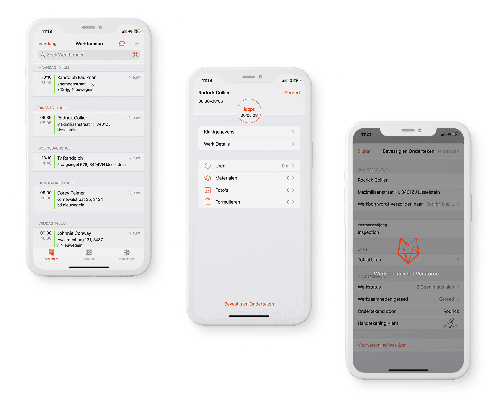
The OutSmart app automatically pulls today's schedule as soon as a technician logs in. Work orders, customer data and object history appear directly on screen — no separate folder, no phone call to the office. Once a work order is completed, all data goes back to the BackOffice for invoicing and reporting.

The app keeps working without an internet connection too: previously synced data stays available, and changes are sent as soon as a connection is restored.

Administrators use device policies and settings to control exactly what an employee can view, edit and send — with one default setup for everyone or employee-specific settings.

OutSmart app on multiple screens
 

From work order to signature, without paper

Technicians register materials, hours and travel time, add photos and documents, and collect a digital customer signature — all in the app. Completed forms and work orders are visible in the office as soon as the app syncs.

What your team can do
  • View, create and complete work orders from the location itself.
  • Register hours and travel time, per job or through Timesheets.
  • Add materials, photos and documents — even offline.
  • Fill in forms and collect customer signatures.
  • Always work with up-to-date customer data and object history.
  • View track and trace during the hours the administrator configures.
Completing a work order in the OutSmart app
3232784

Work orders per year

5172

Customers trust OutSmart

14
+

Years of experience

We constantly had to create work orders manually with pen and paper. By providing a clear digital system with many options, along with an excellent helpdesk that assists with everything, even the smallest questions, Outsmart has helped us.

Thomas Loos, Display4all

We used to lose work orders now and then, which made tracking time a challenge. With the easy digital entry of work orders, it's much simpler for the technician to manage the administration. Having 100% accurate work orders has definitely cut our administrative time in half.

Pascal Hanenbergh, Hanenberg Techniek


Frequently asked questions about the OutSmart app

Yes, the app is free to download from the App Store and Google Play. It uses your existing OutSmart subscription.
Yes, core functionality is the same on both platforms; some screens and names can differ slightly. See the dedicated iOS and Android pages for platform-specific details.
An internet connection is needed to sync and send completed work orders. Previously synced data stays available without a connection.
Yes, if that setting is enabled in the app settings.
Yes, through track and trace, only during the days and hours the administrator configures.
Use device policies and settings to configure one default setup for everyone, or adjust permissions per employee.
Once the app syncs, all data goes back to the BackOffice for invoicing, reporting and archiving.
No, the app is part of your OutSmart subscription regardless of your employees' platform.

Try OutSmart completely free for 14 days!